Seoul Cashless Travel Guide (2026): Wowpass vs. NAMANE vs. Cash Hacks for Foreigners
As a local living in Seoul, I often see travelers looking completely lost at cashier counters because their international credit cards were suddenly declined. People read online that South Korea is an almost 100% cashless society. That is technically true, but there is a major catch. Korea’s cashless infrastructure is heavily optimized for domestic bank cards, resident registration numbers, and local phone verification. When you try to navigate this network with a foreign credit card or your home country's mobile wallet, you will likely hit unexpected digital brick walls.
In this guide, I will share local insights on payment methods in Korea. We will break down why your cards might fail, compare the two biggest tourist card solutions—Wowpass and NAMANE—and outline the scenarios where you still absolutely need physical Korean Won (KRW) cash in your wallet.
Why Do Foreign Credit Cards Fail in South Korea?
Before we jump into the solutions, you need to understand the problem. When I visited local cafes and pop-up stores in neighborhoods like Seongsu-dong (like those in our Seongsu-dong Pop-Up Store Survival Guide), I regularly noticed tourists struggling to pay.
Here are the primary reasons why your credit cards might not work in Seoul:
- Domestic Card Networks: Many small independent shops, boutique cafes, and traditional markets use local point-of-sale (POS) terminals that do not route international transactions through Visa, Mastercard, or AMEX.
- Strict Verification Protocols: Korean online payment gateways (PG) and delivery apps require a domestic phone number linked to a Korean resident registration number. Without these, you cannot buy things through apps or ride-hailing services easily.
- Foreign Transaction Blocks: Even if a terminal accepts international cards, your home bank might flag consecutive transactions in Seoul as suspicious activity and temporarily freeze your card.
To avoid these headaches, tourist-specific prepaid cards have become a necessity. Let us compare the two leading options available on the market today.
Wowpass vs. NAMANE Card: Which is Best for You?
Prepaid cards act like domestic Korean cards. You load money onto them, and the merchant’s machine registers the transaction as a local payment, bypassing international networks. The two main cards designed for tourists are Wowpass and NAMANE.
Here is a quick comparison table to help you decide:
| Feature | Wowpass Card | NAMANE Card |
|---|---|---|
| Primary Focus | Currency Exchange & Seamless Local Payments | Custom Card Design & Separate Balances |
| How to Issue | Physical Wowpass Kiosks (scans passport) | NAMANE Kiosks & Mobile App |
| Top-up Methods | Cash (foreign currencies: USD, EUR, JPY, etc., or KRW) | Cash (KRW only) or Credit Cards (App/Kiosk) |
| Transit Card | Built-in T-money (shares card body) | Built-in Railplus transit card |
| Wallet Partition | Cash balance & transit balance are separate | Pay balance & transit balance are separate (can transfer between them) |
| Best For | Travelers wanting easy kiosk exchange and standard card use | K-Pop fans wanting custom prints and app-based card top-ups |
The Local Verdict on Wowpass
Wowpass is the most popular card for a reason. Its greatest strength is currency exchange. You do not need to visit a traditional bank or currency booth in Myeongdong. You walk up to a orange Wowpass kiosk, insert your USD, EUR, or other local cash, and the kiosk instantly converts it and issues a physical card loaded with Korean Won. It functions as a local debit card and has a built-in T-money chip.
The Local Verdict on NAMANE
NAMANE allows you to customize the front of your card with any photo (such as your favorite K-Pop idol, your pet, or a travel photo) via their app, which you then print at a kiosk. Another key advantage is that you can top up the card using an international credit card through the NAMANE app, although this comes with a processing fee. With Wowpass, you can only top up with cash at kiosks.
Step-by-Step Guide: How to Get and Use a Wowpass Card
Getting your hands on a Wowpass card is straightforward, but you should know exactly what to do to save time.
Step 1: Locate a Wowpass Kiosk
You can find Wowpass kiosks inside major subway stations (such as Seoul Station, Hongdae Entrance, and Myeongdong), premium Hotel lobbies, and major tourist hubs. If you need assistance or want to find nearby kiosks, you can visit the Myeong-dong Tourist Information Center (located at 66, Eulji-ro, Jung-gu, Seoul). They have maps, helpful staff, and often have kiosks nearby.
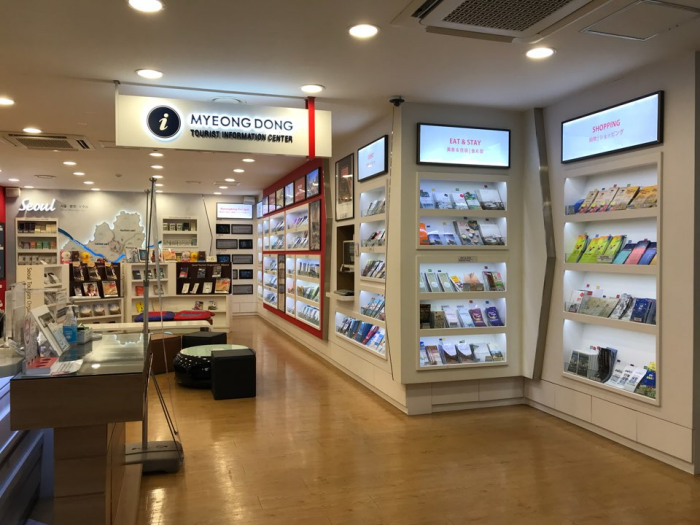
(Photo: Source - Korea Tourism Organization, KOGL Type 3)
Step 2: Prepare Your Passport and Cash
To issue a card, the kiosk requires passport verification. Make sure your physical passport is ready (digital copies or photos on your phone will not work). You will also need foreign cash (USD, EUR, SGD, JPY, etc.) or Korean Won to load onto the card.
Step 3: Issue the Card at the Kiosk
- Select "Issue New Card" on the touchscreen.
- Select your preferred language.
- Scan your passport.
- Agree to the terms of service.
- Insert your cash notes. The screen will show the current exchange rate and the resulting KRW balance.
- The kiosk will output your physical card.
- Important: Remember to register the card on the official Wowpass app on your smartphone immediately to monitor your balance and lock the card if you lose it.
Step 4: Pay and Travel
You can now use the card like any domestic debit card at restaurants, retail stores, convenience stores, and cafes. Simply insert the chip into the payment terminal.
The T-money Transit Card Catch (Read This Before You Ride)
Here is where many travelers run into frustrating situations.
Even though cards like Wowpass and NAMANE contain transit chips (T-money or Railplus) in the same plastic card, the money you use for buying coffee or clothes is completely separate from the money you use to ride the subway or bus.
This means:
- Your Wowpass card might have 100,000 KRW loaded on its retail wallet.
- If you tap the card at the subway turnstile, the gate may say "Insufficent Balance" because your transit wallet is empty.
- You cannot transfer funds from your Wowpass retail wallet to the transit wallet at the kiosk.
- To reload the transit wallet, you must use physical KRW cash at the yellow ticket reload machines inside subway stations or at convenience stores.
When you purchase a Get Korea Transport Pass, you must keep this partition in mind. Always carry small cash denominations (1,000 KRW, 5,000 KRW, and 10,000 KRW bills) specifically for topping up your transit card at station kiosks.
Apple Pay, Google Pay, and Samsung Pay: Do They Work?
Many travelers ask me if they can leave their wallets at the hotel and rely entirely on mobile payments. Here is the realistic situation:
- Apple Pay: Apple Pay works in Korea, but it is limited to stores that have NFC terminals supporting international Visa/Mastercard networks. You can use it at major convenience store chains (CU, GS25, 7-Eleven), Lotte Department Store, Costco, and Olive Young. However, local cafes, independent restaurants, and taxis usually do not support it.
- Google Pay: Google Pay is practically unsupported for international cards at standard physical terminals in South Korea.
- Samsung Pay: Foreign Samsung Pay wallets generally do not work on Korean terminals because local terminals use a different magnetic secure transmission (MST) format optimized for domestic card issuers.
Therefore, do not rely on your smartphone for payments in Korea. You should always carry a physical card like Wowpass and some cash.
Crucial Situations Where You Still Need Physical Cash in Seoul
Even in a cashless society, there are times when physical cash is the only way to get things done. Make sure to keep some cash on hand for these four situations:
1. Traditional Markets and Street Food
If you visit famous traditional food hubs, you will need cash. For details on what to eat, see our Seoul Traditional Market Food Guide (2026) which compares Gwangjang, Tongin, and Mangwon markets. While some large stalls accept credit cards, smaller vendors and street food carts (especially in tourist streets like Myeongdong) only accept physical cash or domestic bank transfers (which travelers cannot perform).
2. Physical Transit Card and Climate Card Reloads
As mentioned before, reloading physical transit cards (T-money) at subway kiosks is a cash-only operation. If you want to use the unlimited transportation option outlined in our Seoul Climate Card (2026 Tourist Guide), you must purchase and reload the physical card using cash at subway stations.
3. Public Luggage Lockers
Most public luggage lockers located inside subway stations only accept T-money or physical KRW coins/cash. If you need to store your heavy bags to explore the city, you will need cash coins or a pre-loaded T-money card to activate the locker lock.
4. Small Coin Laundromats and Gachapon Machines
If you are staying at an Check Top Seoul Hotels on Agoda that does not have in-room washers, or if you want to try local capsule toy machines (Gachapon) in Hongdae, you will need physical 500 KRW coins.
Local Survival Tips for Stress-Free Payments in Seoul
To ensure your trip is smooth and hassle-free, keep these local payment rules in mind:
- Carry a Cash Reserve: I recommend keeping 30,000 to 50,000 KRW in physical cash at all times. Keep this cash in smaller bills (1,000 and 5,000 KRW) because reloading machines do not accept 50,000 KRW notes for small transit transactions.
- Download Transit and Map Apps Early: Google Maps does not provide walking directions in Korea. You must use KakaoMap or Naver Map. You can download these apps and check routes before leaving your country. Make sure to Reserve Korea Unlimited eSIM/SIM online so you can navigate the city with constant internet access.
- Locate Global ATMs: If you run out of cash, look for ATMs that display a prominent "Global ATM" sign. ATMs at major banks like Hana Bank, Woori Bank, and Shinhan Bank are reliable for international debit cards, whereas ATMs inside convenience stores often fail to read foreign cards.
With these preparations, you will navigate Seoul's payment systems like a local, avoiding payment issues and enjoying everything the city has to offer.
Frequently Asked Questions (FAQ)
Q1: Can I reload my Wowpass card using my international credit card?
No, physical Wowpass kiosks only accept cash (in foreign currencies or KRW) for loading the retail wallet. If you want a card that can be topped up via a mobile app using an international credit card, consider getting a NAMANE card instead.
Q2: Can I withdraw remaining cash from my Wowpass card before leaving Korea?
Yes, you can withdraw cash from your Wowpass card at any official Wowpass kiosk. There is a small cash-out processing fee (usually around 1,000 KRW), and the card must be inserted into the machine to complete the transaction.
Q3: Can I reload my Climate Card using a credit card?
Starting in late 2024 and through 2026, some major Seoul subway stations have upgraded their ticket machines to accept domestic credit cards for Climate Card reloads. However, many stations and physical cards still require physical KRW cash, so carrying cash is always the safest option.


